


Birdfy
4.3818.00 Reviews
App Specs
- Version
- 1.20.10
- Updated On
- License
- Free
- Downloads
- 100,000+
- Developer
- Netvue, Inc.
- Categories
- Video Players & Editors
- Platform
- Android
Screenshots
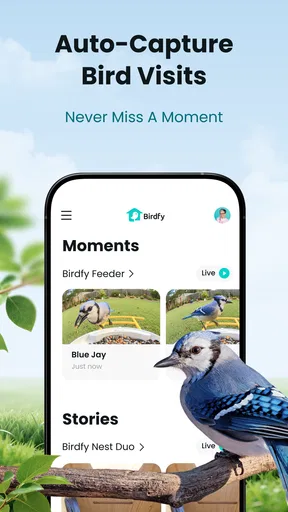
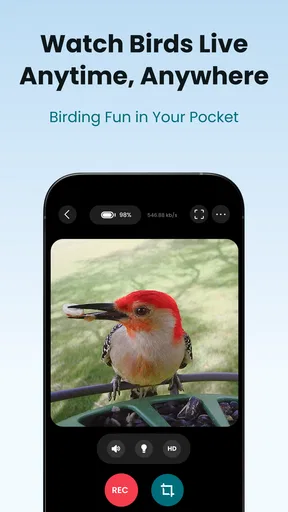
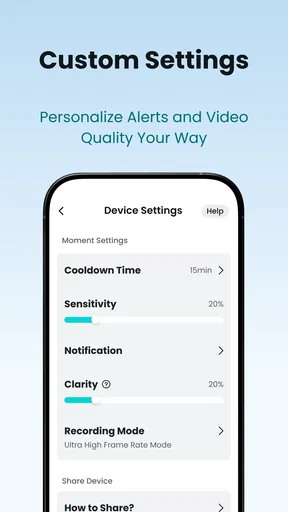
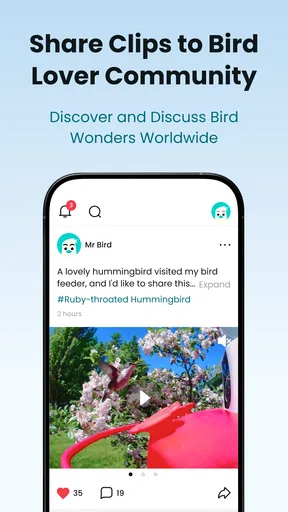
 Analysis by AppCompare
I came to Birdfy looking for a simple way to make the activity around a bird feeder more engaging, rather than another general-purpose video editor or player. That distinction matters: it is an app from Netvue, Inc. in the video-player-and-editor category, but its appeal is tied to watching birds and making those moments part of a hobby. I would approach it as a companion for curious observers, not as a replacement for binoculars, a field guide, or careful identification.
From a quick glance to a birdwatching routine
A useful way to think about the experience is as a small workflow: notice a bird, take time to work out what you saw, then decide whether to keep the moment for yourself or share it. In an everyday setting, that might mean spotting activity outside while making breakfast, pausing to look more closely, and returning later to compare the sighting with your own notes. The value is less about turning every visit into a project and more about giving casual attention somewhere to go.
Before relying on any identification, I would treat a photo as a clue rather than a verdict. A bird partly hidden by a feeder, a distant view, or an awkward angle can make visual details hard to judge. If a result seems surprising, compare the visible markings and setting with a field guide or another trusted reference. That extra check is a practical habit, not a criticism of using an app: it helps keep the excitement of a possible new sighting separate from certainty.
What to expect from the app and its costs
The app is free to install, with in-app purchases ranging from $2.49 to $104.99 per item, so I would look at any purchase details in the app before deciding whether they fit the way I plan to use it. A free starting point makes it easier to explore, but the broad price range means it is sensible to distinguish between features I would use regularly and extras that would only be interesting once. It is rated for Everyone, and the current version is 1.20.2, with Android 7.0 as the minimum operating-system requirement.
Its audience is not limited to people who can already name every bird in their garden. A beginner can use an identification prompt or species information to turn a fleeting look into a reason to learn, while a more experienced watcher may prefer using it as one part of a wider routine. The store average is 3.3 from 976 ratings, and the app has passed 100K installs. I would take that rating as a reason to keep expectations measured: try the basic experience yourself before building a daily habit around it.
Discovering the Features of Birdfy
Upon launching Birdfy, the first thing you'll notice is its sleek and user-friendly interface. The app opens with a vibrant home screen filled with stunning images of birds that immediately get you excited about the world of avian wonders. Navigation is intuitive, making it easy even for tech novices to find their way around.
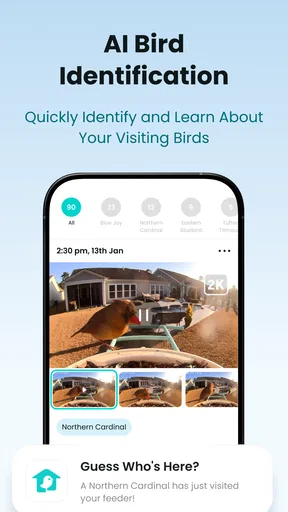
One of the standout features is the bird identification tool. Simply snap a photo of any bird you come across, and the app will work its magic to identify the species. It's like having a bird encyclopedia in your pocket! And if you're unsure about the quality of your photo, fret not. The app's AI is surprisingly adept at recognizing even the blurriest of shots.
Worth Reading Before You Choose

EA SPORTS FC Mobile 26 Is a Bigger Football Game, but It Takes Time

Flipboard Shows What News Apps Must Do Beyond the Feed

Switching to Android Auto Means Rethinking Your Driving Routine

Google Calendar Makes a Crowded Week Easier to Manage

Ludo King Makes the Most of the Minutes Between Plans

Baby Panda World Brings Quick Play to Modern Phones, but Its Game Library Feels Busy
Building Your Birdwatching Community
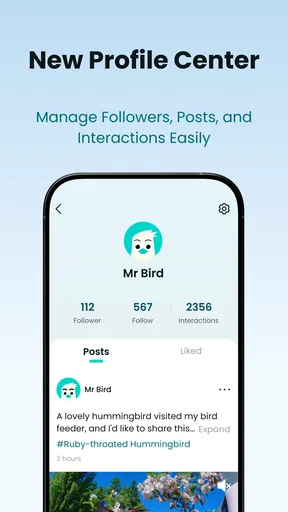
Birdwatching is often thought of as a solitary activity, but Birdfy encourages community interaction. There’s a fantastic feature where you can share your sightings with fellow bird lovers. You can also join discussions, participate in challenges, and even compete with friends to see who can spot the most species. It's a great way to connect with others who share your passion.
Moreover, the app offers a comprehensive database of bird species, complete with detailed descriptions, habitat information, and even audio clips of bird calls. This database is constantly updated, ensuring that you have access to the most accurate and recent information. It's perfect for those moments when you're curious about the birds singing in your backyard.
Making a sighting useful after the moment passes
For me, the strongest reason to keep a bird app nearby is what happens after the bird has flown away. A photo can preserve enough detail to revisit later, while a description or call recording can give you another way to compare what you noticed. I would use those references to build a more careful picture, rather than treating one image or one sound as conclusive. If you are learning, jot down what stood out before looking up a match; doing so helps you notice which features you are actually using to identify a bird.
There is also a sensible handoff between personal observation and community sharing. I would first check that the sighting is clear enough to be useful, then add context in my own words before posting it. That makes a shared observation more informative than an image alone, and it gives other birdwatchers something concrete to discuss. If the bird is common, the moment can still be worth recording: repeated sightings can help you notice patterns in your own garden even when they are not rare discoveries.
Customization and Personalization
One of my favorite aspects of Birdfy is its level of customization. You can tailor the app to suit your preferences, from changing the theme to setting up notifications for when new birds are spotted in your area. The app also keeps a personalized diary of your sightings, complete with dates, locations, and any notes you might want to add. It's a fantastic way to document your birdwatching journey.
And if you're someone who loves to plan, the app includes a calendar feature that tracks bird migration patterns. This means you can prepare for when your favorite species are likely to pass through your area, ensuring you never miss a sighting.
Making notifications and planning work for you
Personalization is most helpful when it reduces effort rather than creating another stream of interruptions. I would begin with only the notifications that genuinely help me notice nearby activity, then adjust if they become easy to ignore. A diary is more useful when notes are specific: the weather, where the bird was perched, or whether it returned can make an old entry more meaningful than a bare name. That turns the record into a personal reference, not merely a collection of labels.
Migration planning is best treated as a prompt to pay attention, not a guarantee that a particular bird will appear on schedule. Local conditions and the luck of the moment still shape what you see. If you have only a short window to watch, use the calendar as a reason to look up from your phone and scan the surroundings; the app should support the observation, not become the observation.
Where this fits among other birdwatching tools
Compared with a printed field guide, an app is easier to carry and can bring photos, sound references, notes, and social activity into one place. A field guide, on the other hand, encourages slower comparison and does not depend on a screen in the same way. General bird-identification apps may be a better fit for someone whose main goal is a focused reference tool, while a camera or ordinary gallery is enough for someone who only wants to save pictures. I see Birdfy as most appealing when the fun is in combining observation with a record and a community, rather than in identification alone.
That blend can also be more than a beginner needs. If you rarely watch birds and simply want to know the name of one visitor, a dedicated reference or a quick check against a reliable guide may be simpler. If you already keep detailed field notes, you may prefer your established method and use an app only when a sound or image needs a second look. The best choice depends on whether the social and record-keeping side will actually become part of your routine.
Final Thoughts on Birdfy
Overall, Birdfy is a must-have app for anyone interested in birdwatching. It blends technology with nature in a way that's both educational and entertaining. The app is regularly updated, and the developers are responsive to user feedback, constantly improving the experience.
Whether you're looking to learn more about the birds in your neighborhood or connect with a global community of bird enthusiasts, Birdfy has something for everyone. It's a delightful way to enhance your appreciation of nature and foster a deeper connection with the feathered friends that share our world. So grab your phone, download the app, and start your birdwatching adventure today!
Who will enjoy it, and when I would choose something else
I would recommend trying it if you already have a spot where birds regularly appear and want to make watching them a small, repeatable part of the day. It also suits families or friends who enjoy sharing discoveries: one person can notice a visitor, another can help compare details, and the group can keep the conversation going beyond the moment. The app’s mix of identification, reference material, a diary, and community features gives that routine several possible next steps.
I would skip it if you want a purely offline reference, dislike sharing features, or expect every quick photo to produce a certain answer. A bird that is backlit, moving, or partly obscured can be difficult to identify from an image, and an app cannot replace patience or a clear view. For a short walk where you want to stay focused on the surroundings, a compact field guide may be less distracting. For someone who wants only to store videos, a regular media app may be more direct.
A practical way to get more from each visit
My preferred routine would be to notice first, photograph only when doing so will not disturb the moment, and then use the app afterward to check details and record what I observed. I would avoid chasing a perfect shot at the expense of watching the bird. If identification feels uncertain, save the observation as a question in your notes instead of presenting a guess as fact. Returning to it later with a better view or a reference book can be more satisfying than forcing an immediate answer.
For a household feeder, a simple weekly habit can make the diary more useful: note which visitors appeared, whether they returned, and what you noticed about their behavior. That does not require turning birdwatching into a competition or filling every field. It gives you a personal baseline, so an unusual visit stands out naturally. Sharing selected sightings rather than every entry also keeps community participation intentional and makes each post easier for others to engage with.
The trade-off between a phone and the moment
The central friction is familiar to anyone who uses a phone outdoors: opening an app can take attention away from the bird itself. A screen is helpful for looking up a call or saving a sighting, but it can also encourage checking menus when the best part is simply watching. I would decide in advance what I want from a session—quiet observation, a record, or a shared discovery—and use only the parts of the app that serve that purpose.
Because it is free to begin but offers paid in-app items, I would also be deliberate about spending. First work out which parts you actually return to: the species information, diary, community, or another tool. Then judge any purchase against that real habit rather than the possibility that you might become a more active birdwatcher later. Birdfy works best when it supports a routine you already enjoy or makes it easier to start one, not when the app itself becomes the main event.
My recommendation
Birdfy is a good fit for a curious beginner or a regular backyard watcher who wants more than a camera roll of bird photos. Its strongest appeal is the path from noticing a bird to learning about it, keeping a record, and optionally sharing the moment. I would keep expectations grounded around identification and use the reference material as support for observation, not a substitute for it.
If that combination sounds enjoyable, the free entry point makes it reasonable to explore before deciding whether it belongs in your routine. If your priority is a specialist guide, an offline experience, or uninterrupted time away from your phone, another approach may suit you better. For me, Birdfy is most worthwhile when it sends me back outside with a sharper eye, rather than keeping me looking at the screen.
Pros
- User-friendly interface for easy navigation.
- Real-time bird identification and tracking.
- Extensive bird species database included.
- Offline mode available for remote areas.
- Customizable alerts for rare bird sightings.
Cons
- Occasional lag in the identification process.
- Requires a stable internet connection for updates.
- Battery consumption can be high during use.
- Limited features in the free version.
- In-app advertisements can be intrusive.
FAQs for Birdfy
What is Birdfy and how does it work?
Birdfy is an innovative app designed for bird enthusiasts. It helps users identify birds through sound recognition and image analysis. Simply record a bird's song or snap a picture, and Birdfy will provide detailed information about the species, including habitat, behavior, and migration patterns. It's an educational tool for both beginners and seasoned bird watchers.
Is Birdfy available for both Android and iOS devices?
Yes, Birdfy is available for download on both Android and iOS platforms. It ensures a seamless experience across different devices, allowing users to enjoy bird identification features no matter their preferred operating system. Check the app store on your device for the latest version and compatibility information.
Does Birdfy require an internet connection to function?
Birdfy requires an internet connection for initial setup and to access its extensive database of bird species. However, once certain data is downloaded, many features can work offline, such as image recognition. For real-time updates and community features, an internet connection is recommended.
Are there any in-app purchases or subscription fees?
Birdfy offers a free version with basic features. For advanced functionalities like expert insights, ad-free experience, and offline access to premium content, users can opt for a subscription. In-app purchases are also available for customizable features and exclusive content, enhancing the overall experience.
How accurate is Birdfy's bird identification feature?
Birdfy utilizes advanced AI algorithms to achieve high accuracy in bird identification. While it generally provides reliable results, factors like image quality and background noise can affect accuracy. The app continuously updates its database to improve precision, and users can contribute to its accuracy by submitting feedback and corrections.


